
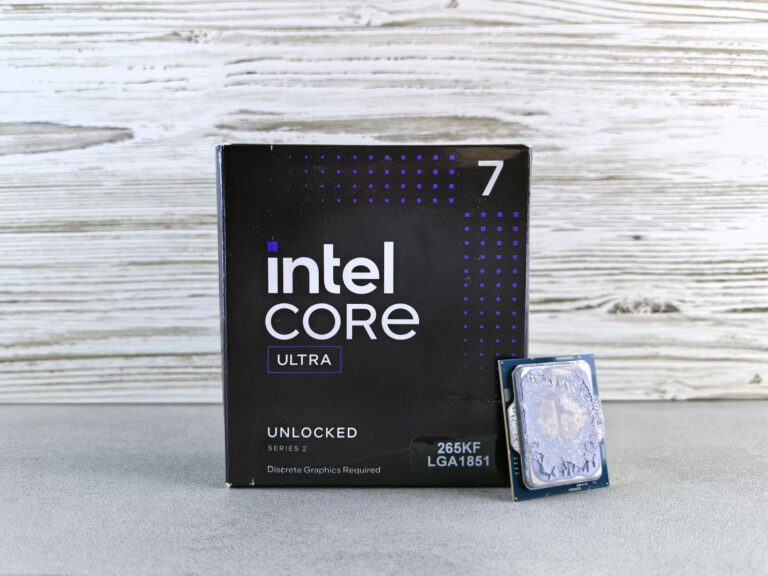
What “Core Ultra” Really Means
In early 2024 Intel introduced the “Core Ultra” label as part of its 13th‑generation Meteor Lake rollout. The name signals a shift from the traditional “Core i” hierarchy to a branding that emphasizes a tightly integrated CPU‑GPU package. A Core Ultra silicon combines Intel’s new performance‑core (P‑core) and efficiency‑core (E‑core) architecture with an advanced Xe‑LP graphics die that lives on the same package, delivering higher bandwidth and lower latency than the classic “CPU‑only” models.
The first Core Ultra chips—such as the i9‑14900K and the i7‑14700—feature up to 24 cores (8 P‑cores + 16 E‑cores) and a graphics block that can be configured with up to 64 execution units. Intel markets this as a “system‑on‑chip” (SoC) solution that targets creators, gamers, and mobile workstations that need strong graphics without a separate discrete GPU.
Core i7: The Proven Workhorse
Since its debut in 2008, the Core i7 moniker has represented Intel’s high‑performance mainstream offering. Over the years the line has evolved from the original Nehalem cores to the current 13th‑generation Raptor Lake and Alder Lake designs. A typical 13th‑gen Core i7, like the i7‑13700K, offers 16 cores (8 P‑cores + 8 E‑cores) and relies on Intel UHD Graphics 770 for integrated graphics. The i7 family is positioned between the more affordable Core i5 and the flagship Core i9, making it a popular choice for enthusiasts, gamers, and content creators who may also pair the CPU with a discrete graphics card.
Architectural Differences
While both Core Ultra and Core i7 share the same hybrid core design, the key differences lie in the integration of graphics and the interconnect technology.
- Package layout: Core Ultra uses a multi‑chip‑module (MCM) approach where the compute die and graphics die are bonded together, offering a unified memory pool. Core i7 CPUs keep the GPU as a separate integrated block on the same silicon but with a more limited bandwidth path.
- Graphics capabilities: The Xe‑LP graphics in Core Ultra can scale to a level that competes with low‑mid‑range discrete GPUs, supporting features such as hardware‑accelerated ray tracing and AV1 decoding. Core i7’s UHD Graphics 770 is sufficient for everyday tasks and light gaming but lacks the raw compute units for demanding visual workloads.
- Power management: Because the graphics die shares the same power domain, Core Ultra can dynamically shift power between CPU and GPU workloads, optimizing for battery life in laptops and reducing total system power draw in desktops.
Both product families support Intel’s Thread Director technology, which intelligently schedules threads across P‑cores and E‑cores based on workload characteristics. This ensures that even legacy software benefits from the hybrid architecture.
Performance in Real‑World Scenarios
Benchmarks from reputable tech publications (e.g., Tom’s Hardware, AnandTech) show that Core Ultra chips tend to pull ahead in mixed CPU‑GPU workloads. In Adobe Photoshop and Premiere Pro tests that leverage GPU acceleration, Core Ultra’s Xe‑LP graphics can shave 15‑20 percent off rendering times compared to a Core i7 with UHD graphics, assuming the same core count.
Pure CPU tasks—such as compiling code, running scientific simulations, or encoding video with CPU‑only codecs—still depend primarily on core count, clock speeds, and cache size. In this domain the performance gap is narrower. A Core i7‑14700K and a Core Ultra‑i7‑14700K with identical core configurations usually differ by only a few percent in single‑threaded scores, while multi‑threaded results are largely dictated by the number of E‑cores.
Gaming performance highlights the graphics advantage. When paired with a mid‑tier discrete GPU, the difference is minimal, but on systems that rely on integrated graphics, Core Ultra can deliver playable frame rates in titles like Elden Ring or Fortnite at 1080p with medium settings—something that would be challenging on a standard Core i7.
Power Consumption and Thermals
Power efficiency has been a focal point for Intel’s recent designs. The hybrid core layout already allows lower‑power E‑cores to handle background tasks, keeping the CPU’s active power draw down. Core Ultra’s unified package further refines this by sharing a single power controller between CPU and GPU, reducing the overhead of separate power rails.
In laptop configurations, Core Ultra models typically show a 5‑10 percent improvement in battery life during mixed workloads compared with a Core i7 of the same TDP. Desktop builds, however, may see a modest increase in peak power draw because the integrated graphics can run at higher frequencies when needed. Proper cooling solutions—such as a quality AIO liquid cooler or a robust air cooler—remain essential for maintaining boost clocks on both chip families.
Choosing the Right Chip for Your Build
When deciding between a Core Ultra and a Core i7, consider the following factors:
- Use case: If you rely heavily on GPU‑accelerated applications (video editing, 3D modeling, AI inference) and want decent graphics without buying a separate GPU, Core Ultra is the clear winner.
- Budget constraints: Core i7 CPUs are often priced lower than their Ultra counterparts, especially when you factor in the cost of a discrete graphics card that you might already own.
- Form factor: Ultrabooks and thin‑and‑light laptops benefit from the integrated Xe‑LP graphics, allowing slimmer designs without sacrificing visual performance.
- Future‑proofing: The higher graphics capability of Core Ultra provides a better safety net as software continues to offload more tasks to the GPU.
For a gamer who already plans to buy a dedicated RTX 4060 or Radeon 7600, a Core i7 still offers ample performance. Conversely, a content creator building a portable workstation may find the added GPU horsepower in Core Ultra worth the premium.
Market Impact and Outlook
Intel’s decision to introduce Core Ultra reflects a broader industry trend toward heterogeneous computing. Competitors such as AMD have long paired strong integrated graphics (Radeon Graphics) with their Ryzen APUs, and Apple’s M‑series chips have demonstrated the appeal of a unified CPU‑GPU architecture. By branding the integrated graphics as a first‑class feature, Intel signals that it intends to compete more directly in the creator‑focused segment.
Early adoption data from major OEMs shows Core Ultra appearing in high‑end ultrabooks (e.g., the Lenovo ThinkPad X1 Extreme) and in select desktop motherboards that target “all‑in‑one” enthusiasts. As software ecosystems continue to optimize for GPU acceleration—especially with AI‑centric APIs like Intel’s oneAPI and OpenCL—the value proposition of an integrated Xe‑LP graphics block is likely to increase.
Looking ahead, the next generation of Meteor Lake (codenamed “Arrow Lake”) is expected to expand the Core Ultra line with even more execution units and support for DDR5‑6000 memory. This evolution should tighten the performance gap between integrated and entry‑level discrete graphics, making the Core Ultra a more compelling option for a broader range of users.
Bottom Line: Core Ultra or Core i7?
Both chip families represent Intel’s latest hybrid architecture, but they cater to slightly different priorities. Core Ultra delivers a more balanced CPU‑GPU experience, ideal for creators, mobile professionals, and anyone who wants respectable graphics without adding a separate GPU. Core i7 remains a solid, cost‑effective choice for users who either already have a dedicated graphics solution or who prioritize raw CPU performance in a traditional desktop setting.
Ultimately, the decision comes down to your workload and budget. If you value integrated graphics that can handle modern rendering tasks and you appreciate the simplicity of an all‑in‑one silicon, the Core Ultra line is worth the investment. If you’re comfortable pairing your processor with a discrete GPU and you want to maximize CPU core counts at a lower price point, a Core i7 will serve you well for years to come.
