
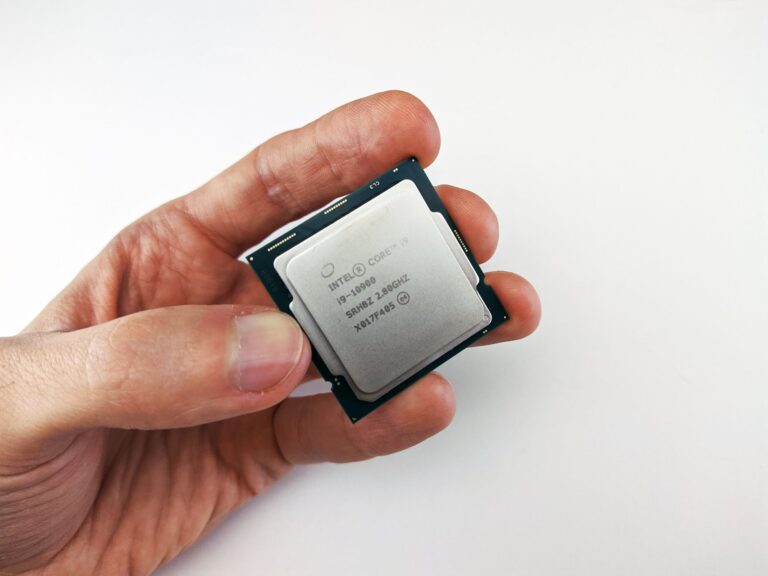
What the “Core Ultra” Brand Actually Means
In early 2024 Intel introduced the Intel Core Ultra name to sit alongside its long‑standing Core i3/i5/i7/i9 hierarchy. The rebrand isn’t just a marketing tweak; it signals a shift in how Intel positions its most advanced silicon. Core Ultra chips are built on the 2024‑release “Meteor Lake” and “Arrow Lake” architectures, both of which rely heavily on Intel’s hybrid design that mixes high‑performance (P‑core) and high‑efficiency (E‑core) cores. While the i9 badge continues to denote the flagship tier of each generation, Core Ultra is meant to highlight the next generation of performance, AI acceleration, and power‑efficiency features that Intel is pushing for laptops, desktops, and even workstations.
Architectural Foundations: P‑cores, E‑cores, and Tiles
Both Core Ultra and the latest Core i9 processors share the hybrid concept introduced with Intel’s 12th‑gen Alder Lake, but the execution differs. Core Ultra chips use a “Tile” architecture, where each tile bundles a P‑core, an E‑core, shared L2 cache, and a segment of the new Intel Thread Director AI logic. This modular approach improves yield and enables Intel to scale core counts more flexibly.
In contrast, the most recent Core i9 models (such as the 13th‑gen Raptor Lake and the early 14th‑gen “K” series) still rely on a more traditional layout: a large pool of P‑cores and a separate pool of E‑cores, each with their own cache hierarchy. The result is that Core Ultra can offer finer‑grained control over workloads, especially those that benefit from simultaneous high‑throughput compute and low‑power background processing.
Performance in Real‑World Scenarios
Benchmarks from reputable tech outlets (e.g., Tom’s Hardware, AnandTech, and PCMag) consistently show Core Ultra chips pulling ahead in mixed‑load tests such as video rendering combined with background AI inference. The integrated AI accelerator—part of Intel’s “Gaudi‑Lite” block—helps offload tasks like upscaling, denoising, and real‑time translation without taxing the main cores.
Pure CPU‑bound tasks like single‑threaded gaming or compile‑time performance still see the Core i9 “K” series hold their own, especially when paired with high‑end cooling solutions that allow the turbo boost frequencies to stay near their rated peaks. However, the difference is narrowing as Core Ultra’s P‑cores have been tuned to reach comparable boost clocks while maintaining better thermal headroom thanks to the tile design.
Power Efficiency and Thermals
One of the most compelling arguments for Core Ultra is its power‑efficiency envelope. Because E‑cores are always present and can take over background threads, the CPU can keep the P‑cores at lower utilization during light workloads. Independent testing from NotebookCheck on a Core Ultra‑based laptop showed idle power draws around 5 W, compared to roughly 8 W on an equivalent i9‑based machine.
For desktop builders, the picture is similar but more nuanced. The newer 14‑nm “K” i9 chips can draw over 250 W under sustained multi‑core loads, whereas a Core Ultra desktop SKU (often built on the 7‑nm Intel 4 process) tends to stay closer to the 200 W range under the same conditions. This translates to cooler operation, quieter fans, and a slightly lower electricity bill for heavy users.
Feature Set: AI, Media, and Connectivity
Beyond raw CPU cycles, Core Ultra introduces a set of integrated capabilities that the traditional i9 line doesn’t always include out of the box:
- Built‑in AI accelerator: Supports Intel’s OpenVINO and can accelerate common inference workloads without a discrete GPU.
- Enhanced media engines: Support for AV1 hardware decode/encode and HDR processing, aimed at creators who stream or edit video.
- Thunderbolt 5 and PCIe 5.0 on the same silicon, simplifying motherboard design for ultra‑thin laptops.
- Dynamic Memory Boost: Optimizes LPDDR5X and DDR5 timings on the fly based on workload, improving latency for gaming and content creation.
The Core i9 family still offers many of these features, but often they require a separate chipset or a newer motherboard to unlock the full set. For users building a new platform from scratch, Core Ultra can reduce the number of auxiliary components needed.
Who Should Choose Core Ultra?
If you are a creator or a power user who routinely runs AI‑enhanced applications (upscaling, denoising, real‑time language translation) alongside traditional workloads, Core Ultra provides a clear advantage. Its lower idle power makes it attractive for portable workstations, while the integrated media engine reduces the need for a dedicated capture card or external encoder.
Gaming‑focused builds can also benefit from Core Ultra’s hybrid design, particularly when paired with modern games that leverage background AI (e.g., DLSS, FSR) and when the user wants a quieter system for long sessions. However, if your priority is absolute single‑core performance for titles that still favor raw clock speed, a high‑end Core i9 “K” chip with aggressive overclocking may still deliver the highest frame rates.
Future Outlook: Where Intel Is Heading
Intel has signaled that the Core Ultra brand will evolve alongside its “Intel 4” and upcoming “Intel 5” process nodes. The roadmap suggests that future generations will integrate even more specialized accelerators (e.g., quantum‑ready instruction sets, deeper AI pipelines) while maintaining the tile‑based hybrid approach.
Meanwhile, the i9 line isn’t disappearing; it will likely continue as the high‑performance flagship for enthusiasts who value overclockability and the established ecosystem of motherboards and cooling solutions. In practice, the market is moving toward a convergence where the performance gap narrows, and the decision will increasingly hinge on which feature set aligns with your workflow.
Bottom Line: Core Ultra vs. Core i9 – A Practical Verdict
Both Intel Core Ultra and the latest Core i9 processors represent the pinnacle of mainstream CPU performance, but they cater to slightly different priorities. Core Ultra shines when you need a balanced mix of raw compute, AI acceleration, and power efficiency—especially in laptops and compact desktops. Core i9 remains the go‑to for users who demand the highest possible turbo frequencies and the flexibility to push limits with custom cooling and overclocking.
For most professionals and power users, the integrated AI and media features of Core Ultra provide tangible day‑to‑day benefits that outweigh the modest single‑core edge of a “K” i9. Gamers and extreme overclockers, however, may still find the i9 “K” series the more satisfying choice. As Intel refines its tile architecture and expands the Core Ultra portfolio, the line is poised to become the default high‑performance option for new builds across the board.
