
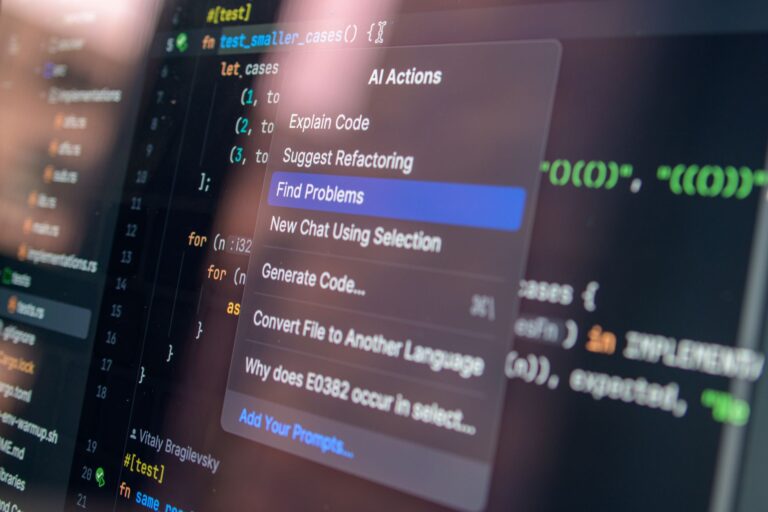
Defining AI‑Assisted Coding
AI‑assisted coding, sometimes called “AI‑powered development” or “code generation AI,” refers to software tools that use artificial‑intelligence models to help programmers write, understand, and refactor code. Rather than replacing the developer, these assistants act as a collaborative partner: they suggest completions, flag potential bugs, generate boilerplate, and answer natural‑language questions about APIs or language semantics. The underlying models are typically large language models (LLMs) trained on massive code repositories, documentation, and technical discussions, allowing them to predict plausible code snippets based on a given context.
How the Technology Works Under the Hood
Modern AI‑assisted coding tools rely on a combination of three technical pillars:
- Large language models: Trained on public code bases such as GitHub, Stack Overflow, and open‑source libraries, these models learn statistical patterns of syntax, idioms, and best practices across many programming languages.
- Contextual awareness: The editor plugin feeds the model the surrounding code, file name, project configuration, and sometimes even recent version‑control history, enabling the AI to generate suggestions that fit the current scope.
- Post‑processing filters: To improve safety and relevance, many tools run additional checks—such as static analysis, linting, or security scanners—on the model’s output before presenting it to the developer.
When a developer types a few characters, the model calculates the probability distribution of possible next tokens and returns the most likely completions. More advanced interactions involve a “chat” interface where the developer can ask natural‑language questions—e.g., “How do I convert a list to a set in Python?”—and receive a concise code example with an explanation.
Key Benefits for Developers
AI assistants are reshaping everyday development workflows in several tangible ways:
- Speeding up routine tasks: Generating repetitive boilerplate—such as data‑class definitions, REST endpoint scaffolding, or unit‑test stubs—can be done in seconds instead of minutes.
- Reducing context switches: Developers no longer need to leave their IDE to search documentation; the assistant surfaces relevant snippets and explanations inline.
- Improving code quality: By surfacing linting warnings or suggesting more idiomatic constructs, the AI can help maintain consistency across a codebase.
- Lowering entry barriers: Newcomers can ask “why” questions and receive examples that demystify language features without digging through multiple tutorials.
These advantages are most pronounced in environments where rapid prototyping is essential—such as startups, hackathons, or data‑science notebooks—yet they also provide value in large, mature codebases where refactoring and documentation are ongoing concerns.
Popular Tools and Platforms
Several AI‑assisted coding products have gained traction in the developer community. While the ecosystem evolves quickly, a few standouts illustrate the range of approaches:
- GitHub Copilot: Integrated directly into Visual Studio Code, JetBrains IDEs, and Neovim, Copilot offers line‑by‑line completions powered by OpenAI’s Codex model.
- Amazon CodeWhisperer: Focused on AWS‑centric development, this service provides suggestions that incorporate best practices for cloud services and security.
- Tabnine: A model‑agnostic solution that can run on‑premises for organizations concerned about code privacy.
- Google AI Studio (formerly Gemini for developers): Offers a conversational interface and code generation capabilities within Google Cloud’s ecosystem.
Most of these tools operate on a freemium model, allowing individuals to try the basic features at no cost while offering enterprise‑grade capabilities—such as private model hosting or compliance reporting—for paying customers.
Challenges and Limitations
Despite their promise, AI‑assisted coding tools are not a silver bullet. Developers should be aware of several practical concerns:
- Hallucinated code: The model may generate syntactically correct but semantically wrong snippets, especially for niche libraries or poorly documented APIs.
- Security and licensing risks: Because the model is trained on public code, there is a non‑zero chance it reproduces snippets with restrictive licenses or insecure patterns.
- Over‑reliance: Beginners might accept suggestions without fully understanding the underlying concepts, which can impede learning.
- Performance impact: Real‑time inference can introduce latency, particularly when the model runs in the cloud and network conditions are suboptimal.
Addressing these issues typically involves a combination of developer vigilance, supplemental static analysis tools, and organizational policies that govern how AI‑generated code is reviewed and merged.
Best Practices for Integrating AI Assistants
Teams that adopt AI‑assisted coding can maximize benefits while mitigating risks by following a few straightforward guidelines:
- Treat suggestions as drafts: Always review and test generated code before committing, just as you would with any third‑party library.
- Leverage version control hooks: Use pre‑commit linters or automated security scans to catch problematic patterns introduced by the AI.
- Educate developers: Conduct short training sessions that cover how the model works, its known blind spots, and how to ask effective prompts.
- Configure privacy settings: For proprietary codebases, opt for on‑premise model hosting or enable data‑privacy modes that prevent code from being sent to external servers.
- Monitor usage metrics: Track acceptance rates of suggestions and any correlation with defect density to assess the tool’s impact over time.
By embedding these practices into the development workflow, teams can turn AI from a novelty into a reliable productivity partner.
Looking Ahead: The Future of AI‑Assisted Development
The next wave of AI‑assisted coding is likely to blend deeper understanding of software architecture with more transparent model behavior. Emerging research focuses on:
- Semantic awareness: Models that can infer design patterns, data flow, and performance implications, enabling suggestions that align with high‑level system goals.
- Interactive debugging: AI that can suggest fixes based on stack traces or test failures, effectively acting as a “pair programmer” during troubleshooting.
- Customizable knowledge bases: Allowing organizations to fine‑tune models on their own code and documentation, reducing hallucination risk and honoring internal coding standards.
- Explainability tools: Interfaces that surface the reasoning behind a suggestion, helping developers trust and learn from the AI’s output.
As these capabilities mature, the role of the human developer will shift further toward high‑level design, critical thinking, and ethical decision‑making—areas where creativity and context still outpace any current model. In the meantime, AI‑assisted coding has already proven its worth as a force multiplier, helping developers write cleaner code faster and keeping the focus on solving problems rather than wrestling with syntax.
