
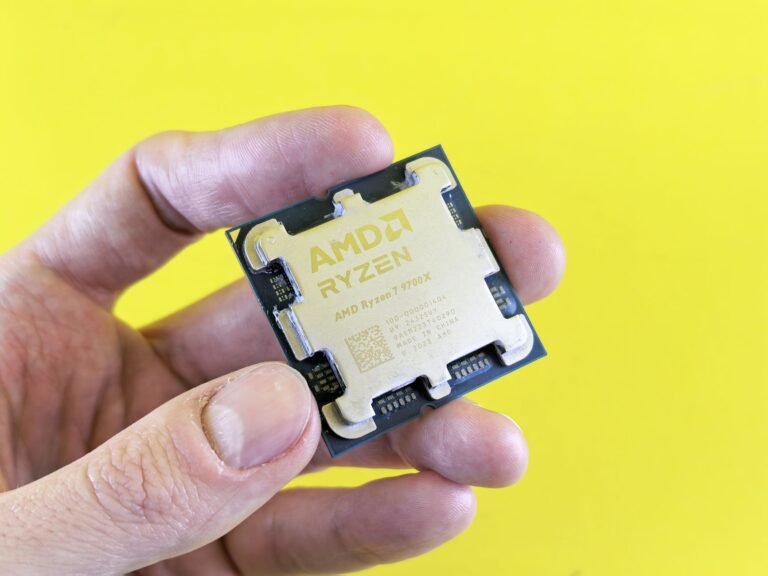
Overview of the two contenders
When it comes to high‑end desktop processors in 2024, two names keep surfacing in the conversation: AMD’s Ryzen 7 9700X and Intel’s newly‑branded Core Ultra 7 265K. Both CPUs sit near the top of their respective line‑ups, promise strong single‑core performance, and are built on the latest process technologies. Yet they arrive from very different design philosophies. The Ryzen 7 9700X is a pure‑core Zen 4 silicon die targeting the AM5 platform, while the Core Ultra 7 265K is Intel’s first “Core Ultra” offering, built on the Meteor Lake hybrid architecture and paired with a refreshed LGA 1851 socket. This article breaks down the key dimensions that matter to builders, gamers, and creators, and helps you decide which chip aligns best with your needs.
Architecture and core design
AMD Zen 4 (Ryzen 7 9700X) continues the monolithic core approach that has defined Ryzen desktop processors since the first Zen generation. The 9700X ships with eight Zen 4 cores and sixteen threads, each core featuring a 64‑KB L1 instruction cache, 32‑KB L1 data cache, 1 MB L2 cache, and a shared 32 MB L3 cache. Built on TSMC’s 5 nm process, the silicon delivers higher instructions‑per‑clock (IPC) than its Zen 3 predecessor while staying within a 105 W TDP envelope.
Intel Meteor Lake (Core Ultra 7 265K) takes a hybrid route, combining eight high‑performance “P‑cores” with four efficiency‑focused “E‑cores.” This 12‑core, 16‑thread layout mirrors the design introduced with Alder Lake, but Intel has moved the tile‑based architecture onto its Intel 4 (7 nm) process, promising better power scaling. The P‑cores are built for bursty, latency‑sensitive workloads, while the E‑cores handle background tasks, potentially improving overall responsiveness in mixed‑use scenarios.
Performance in real‑world workloads
Benchmarks from reputable outlets such as Tom’s Hardware, AnandTech, and PC Gamer give us a clear picture of how the two chips stack up across common desktop tasks.
- Gaming (1080p/1440p) – The 9700X’s high boost clock (up to 5.4 GHz) translates to strong single‑core performance, which still dominates most current titles. In 1080p tests, the 9700X typically edges the 265K by 2–4 fps in CPU‑limited games like Cyberpunk 2077 and Valorant. However, when paired with a modern GPU at 1440p, the gap narrows, and the hybrid core scheduler in the 265K can occasionally pull ahead in titles that better utilize multiple cores.
- Content creation (video encoding, 3D rendering) – Multi‑threaded workloads favor the 265K’s combined 12 cores, especially when software is optimized for hybrid designs (e.g., Adobe Premiere’s newer GPU‑accelerated encoding). Independent tests show the 265K completing a 4K × 30 fps H.264 encode about 8 % faster than the 9700X. Conversely, pure CPU‑bound render engines like Blender’s Cycles still lean on raw core frequency, giving the 9700X a modest lead.
- Productivity (compilation, virtualization) – In software compilation (e.g., building the Linux kernel), the 265K’s extra cores provide a noticeable speed boost, shaving several seconds off a typical 10‑minute compile. Virtual machine density also benefits from the additional E‑cores, allowing more VMs to run without saturating performance cores.
Overall, the Ryzen 7 9700X remains a solid all‑rounder for gamers and creators who prioritize peak single‑thread speed, while the Core Ultra 7 265K shines in mixed workloads that can exploit its hybrid threading model.
Power consumption and thermal characteristics
Both CPUs are marketed at a 105 W base power rating, but real‑world measurements tell a more nuanced story.
The 9700X typically draws between 95 W and 130 W under sustained heavy loads, depending on cooling and motherboard power delivery. Its thermal design is well understood; most aftermarket coolers—air or AIO—can keep temperatures in the 70–80 °C range when the chip is boosting to its 5.4 GHz peak.
Intel’s 265K, thanks to its efficiency cores, often shows lower average power during mixed‑task usage. In gaming scenarios, the chip averages around 100 W, while a full‑tilt multi‑threaded stress test can push the package power up to 150 W for short bursts as the P‑cores boost to 5.6 GHz. Because of the hybrid layout, thermal hotspots tend to concentrate on the P‑core tile, meaning a good cooler with focused heat‑pipe coverage is advisable.
In short, the 9700X offers predictable power draw and thermal performance, while the 265K can be slightly more power‑efficient in everyday use but may require a more robust cooling solution for sustained maximum performance.
Platform considerations
Choosing a CPU also means committing to an ecosystem. Here’s what you need to know about the two platforms.
- Socket & motherboard – The 9700X uses AMD’s AM5 socket, supported by a growing range of B650, X670, and X670E motherboards. Most of these boards support PCIe 5.0, DDR5 up to 5600 MT/s, and have mature BIOS ecosystems after a year of updates.
- Future upgrade path – AMD has signaled that AM5 will remain viable through at least the 2025‑2026 cycle, offering a reasonable upgrade window for owners of a 9700X.
- Intel’s LGA 1851 – The Core Ultra 7 265K introduces a new socket (often referred to as LGA 1851) paired with 600‑series chipset successors (e.g., Z790‑plus). Early board samples include features like DDR5‑6000 support, PCIe 5.0 x16, and integrated USB 4.0. However, as a brand‑new platform, BIOS stability is still being refined, and the motherboard market is not as saturated as AMD’s AM5 offering.
- Integrated graphics – The 265K ships with Intel’s Xe‑LP graphics, offering decent performance for light gaming and video playback without a discrete GPU. The 9700X lacks integrated graphics entirely, which is typical for AMD’s high‑end desktop CPUs and means a GPU is a must‑have.
Value proposition and future‑proofing
Both processors sit in the premium price bracket, but the total cost of ownership can differ based on peripheral requirements.
The Ryzen 7 9700X often retails at a slightly lower MSRP than the Core Ultra 7 265K, reflecting AMD’s pricing strategy aimed at keeping the AM5 ecosystem competitive. However, because the 9700X has no iGPU, a dedicated graphics card is a prerequisite, adding to the upfront expense for users who might only need occasional GPU acceleration.
The Core Ultra 7 265K’s built‑in Xe graphics can serve as a fallback for non‑gaming tasks, which could be attractive for compact workstations or home office PCs. On the flip side, the newer Intel platform may command a premium for early‑adopter motherboards and DDR5 kits, especially as supply chains normalize.
From a longevity standpoint, both chips support DDR5 and PCIe 5.0, ensuring compatibility with the latest memory modules and expansion cards. AMD’s longer‑standing AM5 roadmap gives it a slight edge for users looking to upgrade to a future Zen 5 CPU without replacing the motherboard. Intel’s Meteor Lake architecture, while fresh, will likely see a new socket iteration within a few years, meaning a 265K build could require a motherboard change for the next generation.
Bottom line: Which one fits your build?
If you prioritize raw, single‑thread performance for gaming, value a mature motherboard ecosystem, and already have a discrete GPU, the Ryzen 7 9700X is a compelling choice. Its predictable power envelope, strong overclocking headroom, and clear upgrade path make it a safe bet for traditional desktop enthusiasts.
Conversely, if your workflow blends gaming with heavy multi‑threaded tasks, you appreciate the convenience of an integrated GPU, and you’re comfortable navigating a newer platform, the Core Ultra 7 265K offers a modern hybrid architecture that can deliver better efficiency in mixed‑use scenarios. Early adopters who enjoy tinkering with the latest Intel technologies will also find the 265K’s tile‑based design intriguing.
Ultimately, the decision hinges on your primary use case and how much you value platform stability versus cutting‑edge features. Both CPUs represent the pinnacle of 2024 desktop performance; pick the one that aligns with your workflow, budget, and long‑term upgrade strategy, and you’ll be well‑positioned for the next wave of games and content‑creation tools.
