
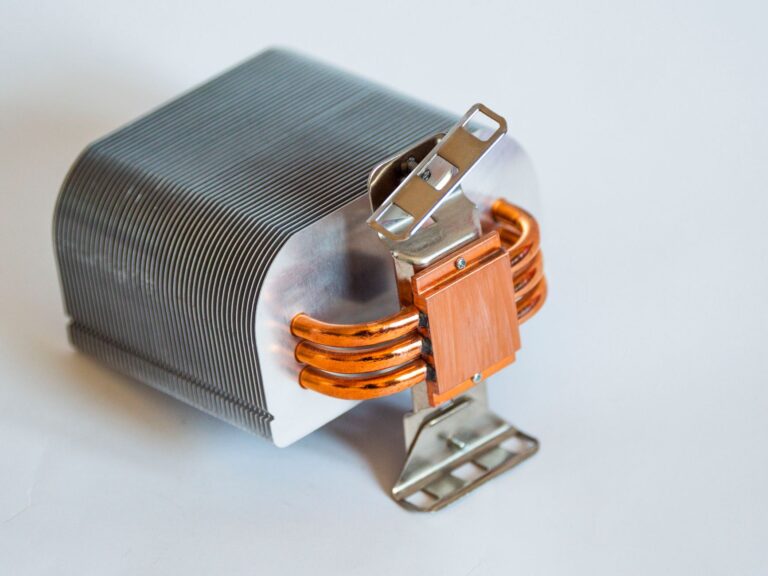
Understanding the Basics: What TDP Actually Means
Thermal Design Power, commonly abbreviated as TDP, is a specification that tells system builders how much heat a processor is expected to generate under normal operating conditions. In plain language, it represents the amount of power that a cooling solution must be capable of dissipating to keep the CPU within safe temperature limits. The figure is expressed in watts (W) and is one of the first numbers you’ll see on a processor’s datasheet or product page.
While the term “thermal design” suggests a focus on heat, TDP is fundamentally a power budget. The heat a chip produces is directly tied to the electrical power it consumes, because almost all of that power ends up as waste heat. By providing a standardized metric, manufacturers give designers a reliable baseline for selecting fans, heat sinks, liquid‑cooling blocks, and even the power delivery components that feed the CPU.
How TDP Is Determined: The Factors Behind the Number
Deriving a TDP figure is not a simple arithmetic exercise; it involves a combination of laboratory testing, architectural analysis, and design goals. Engineers typically run a suite of benchmark workloads that simulate typical user scenarios—such as web browsing, office productivity, or light gaming—and measure the average power draw and temperature under those conditions. The highest sustained power draw observed during these tests often becomes the reference point for the TDP rating.
Several variables influence the final number, including:
- Core count and clock speed: More cores and higher frequencies naturally increase power consumption.
- Silicon manufacturing process: Smaller node sizes (e.g., 7 nm vs. 14 nm) generally improve efficiency, lowering TDP for comparable performance.
- Architectural features: Technologies such as simultaneous multithreading, large caches, or integrated graphics add to the overall power envelope.
- Target market segment: Mobile and ultrathin laptops aim for low TDP (often below 15 W), while enthusiast desktop CPUs can be rated at 125 W or higher.
Because the testing methodology can vary between manufacturers, two CPUs with the same TDP might have different real‑world power draws, especially when pushed beyond the benchmark workloads.
Why TDP Matters for Cooling Solutions
The most immediate practical impact of a CPU’s TDP is on the cooling system you need to keep the processor stable. A heat sink or liquid‑cooling loop is typically rated by the maximum amount of heat it can move away from the chip per second—again measured in watts. If the cooler’s rating falls short of the CPU’s TDP, the temperature will climb, leading to throttling, reduced performance, or even thermal shutdown.
When selecting a cooler, it’s common to add a safety margin. For a 95 W desktop processor, a cooler rated for 120 W or more provides headroom for occasional spikes, overclocking, or higher ambient temperatures. In compact laptops, designers rely on passive cooling solutions (heat pipes and chassis‑integrated fans) sized precisely to match the low TDP, balancing performance and acoustic comfort.
Beyond the cooler itself, the case airflow, fan placement, and even the thickness of the thermal paste can affect whether a system stays within the intended thermal envelope. This is why many high‑performance builds include multiple intake and exhaust fans to ensure the heat generated by the CPU (and other components) can be expelled efficiently.
TDP vs. Real‑World Power Consumption: Understanding the Difference
It’s easy to conflate TDP with the actual power draw of a CPU at any given moment, but the two are not interchangeable. TDP represents a design target under a specific, repeatable workload, not the absolute maximum power the chip can ever consume. In practice, the power draw can be lower during idle or light tasks and higher during intensive bursts such as gaming, video rendering, or scientific simulations.
Most modern CPUs feature dynamic power management technologies—like Intel’s Speed Shift or AMD’s Precision Boost—that adjust clock speeds and voltage on the fly. These mechanisms allow the processor to exceed its nominal TDP for short periods when performance is needed, while dropping below the rating when the workload is light. This “burst” capability is often referred to as “turbo power” or “maximum turbo frequency,” and it’s why you might see a laptop battery drain faster during a gaming session than the TDP alone would suggest.
For system designers, the key takeaway is to consider both the sustained TDP and the potential short‑term peaks when choosing power supplies and cooling components. A quality power supply will handle transient spikes without voltage droop, and a robust cooler will keep temperatures in check even during those brief bursts.
Designing Systems Around TDP: Practical Guidance for Builders
Whether you’re assembling a workstation, a gaming rig, or a quiet home office PC, the CPU’s TDP is a central piece of the puzzle. Here are a few practical steps to ensure your build stays balanced:
- Match the cooler to the TDP: Choose a heat sink, AIO liquid cooler, or custom loop rated for at least the CPU’s TDP, plus a modest margin.
- Check the case airflow: Ensure the chassis has enough intake and exhaust capacity to move the total heat generated by CPU, GPU, and other components.
- Select an appropriate power supply: A PSU rated for at least 20‑30 % higher wattage than the sum of all component TDPs provides stability under load.
- Consider the motherboard VRM design: Voltage regulator modules must be able to deliver clean power at the CPU’s maximum draw; high‑TDP processors often require boards with beefier VRMs.
- Plan for future upgrades: If you anticipate moving to a higher‑TDP CPU later, choose a cooler and case that can accommodate the extra heat.
Following these guidelines helps avoid the common pitfalls of overheating or under‑powering a system, both of which can degrade performance and shorten component lifespan.
Dynamic and Configurable TDP: How Modern CPUs Adapt
In recent years, manufacturers have introduced features that let users or OEMs adjust the effective TDP of a processor after it ships. This flexibility is especially valuable for thin‑and‑light laptops, where manufacturers may offer “low‑power” or “high‑performance” modes that trade off battery life against raw speed.
Configurable TDP (cTDP) lets a system lower the processor’s maximum power envelope—often by a few watts—to reduce heat and extend battery life, or raise it within safe limits when performance is paramount. The adjustment is achieved by scaling the base clock frequency and voltage, which directly influences power consumption (P ≈ V² × f). Because the silicon itself remains unchanged, the CPU can smoothly transition between the two states without requiring a hardware change.
Dynamic TDP also appears in the form of “boost” algorithms. When thermal and power headroom exist, the processor temporarily exceeds its base clock, drawing more power than the nominal TDP. Once the temperature or power budget is reached, the CPU throttles back to stay within its design envelope. This approach delivers a responsive performance experience without compromising long‑term reliability.
Looking Ahead: TDP in an Era of Heterogeneous Computing
The rise of specialized accelerators—such as GPUs, AI inference engines, and dedicated neural processing units—means that CPUs are no longer the sole contributors to a system’s heat budget. Designers now think in terms of a total system thermal envelope, balancing the TDP of the CPU with that of other high‑performance blocks.
As semiconductor technology continues to shrink and power‑efficiency improves, we can expect CPU TDP numbers to stabilize or even drop for a given performance tier. At the same time, the ability to dynamically reallocate power between CPU cores and integrated accelerators will become more sophisticated, allowing laptops to deliver desktop‑class performance when needed while staying cool during everyday tasks.
For enthusiasts and everyday users alike, understanding TDP remains essential. It informs cooling choices, power budgeting, and expectations around performance throttling. By keeping an eye on how manufacturers define and implement TDP—and by recognizing the distinction between a design target and real‑world power draw—you’ll be better equipped to build, buy, or troubleshoot systems that stay cool, run efficiently, and deliver the performance you expect.
