
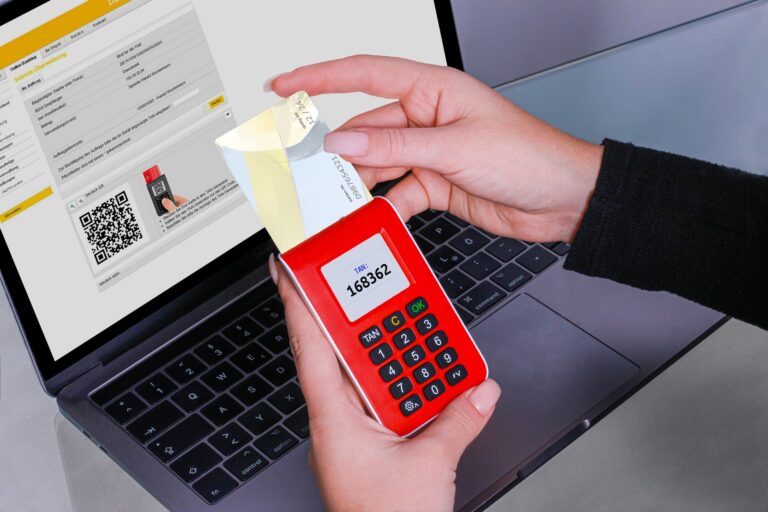
What Two-Factor Authentication Really Is
Two-factor authentication (2FA) is a security method that requires users to present two separate pieces of evidence before they can access an account. The first factor is typically something the user knows—like a password or PIN. The second factor is something the user has (a hardware token, a smartphone app, or a text message) or something the user is (a biometric characteristic such as a fingerprint or facial pattern). By combining two different categories of credentials, 2FA makes it much harder for a malicious actor to gain unauthorized access, even if one of the factors has been compromised.
Why a Password Alone Isn’t Enough
Passwords have been the cornerstone of digital security for decades, but they suffer from several well‑documented weaknesses:
- Reuse and weak choices: Many people reuse the same password across multiple services or choose simple, guessable phrases.
- Phishing attacks: A convincing email can trick a user into entering credentials on a fraudulent site.
- Credential leaks: Large data breaches regularly expose millions of usernames and passwords.
When a password is the sole gatekeeper, any of these problems can lead to a successful breach. Adding a second factor creates a barrier that attackers cannot easily bypass with just a stolen password.
How the Second Factor Stops Common Attack Vectors
Most attacks that succeed against password‑only systems rely on obtaining the password itself. Here’s how 2FA thwarts those approaches:
- Credential stuffing: Attackers use lists of leaked passwords to try logins en masse. Without the second factor, every correct password grants entry; with 2FA, each attempt stalls at the verification step.
- Man‑in‑the‑middle (MITM) phishing: Even if a user enters their password on a fake site, the attacker still needs the real second‑factor token, which is typically delivered to the user’s device and not visible to the attacker.
- Keyloggers and malware: Malicious software can capture keystrokes, but it cannot duplicate a time‑based one‑time password (TOTP) or a hardware token response that changes every 30 seconds.
In each case, the attacker is forced to obtain a physical device, a biometric sample, or a time‑sensitive code—resources that are far less likely to be compromised in bulk.
Different Types of Second Factors and Their Strengths
Not all 2FA methods are created equal. Understanding the trade‑offs helps users choose the most appropriate protection for their needs.
SMS and Voice Call Codes
These are the most widely deployed because they require no extra app installation. A one‑time code is sent to the user’s phone number, and the user types it into the login prompt. While better than a password alone, SMS is vulnerable to SIM‑swap attacks, interception by state actors, and network‑level exploits. For low‑risk accounts, SMS may be acceptable, but security‑focused users should consider stronger alternatives.
Authenticator Apps (TOTP)
Apps such as Google Authenticator, Authy, and Microsoft Authenticator generate time‑based one‑time passwords that change every 30 seconds. Because the secret key never leaves the device, an attacker would need physical access to the phone or to compromise the app’s storage. This method is immune to SIM‑swap attacks and is considered a solid middle ground between convenience and security.
Hardware Tokens
Physical devices like YubiKey, Feitian, or Nitrokey implement the Universal 2nd Factor (U2F) or FIDO2 standards. When a user touches the token, it cryptographically signs a challenge from the service, proving possession without ever transmitting a reusable secret. These tokens are resistant to phishing, man‑in‑the‑middle attacks, and malware because the private key never leaves the device. The primary downside is the need to carry the token and replace it if lost.
Biometrics
Fingerprint scanners, facial recognition, and voice authentication fall under “something you are.” Modern smartphones embed biometric data in secure enclaves, making it difficult for an attacker to extract the raw template. Biometrics are convenient but can be vulnerable to spoofing attempts and may raise privacy concerns. Most platforms use biometrics as a convenience layer that still requires a password or PIN as a fallback.
Real‑World Scenarios: How 2FA Prevents a Hack
Consider a typical phishing attack. An employee receives an email that looks like a legitimate request from their company’s IT department, prompting them to log into a fake portal. The employee dutifully enters their username and password, which the attacker now possesses. If the service only requires a password, the attacker can immediately log in and exfiltrate data.
When the same service enforces 2FA via an authenticator app, the attacker hits a wall. The fake portal may attempt to capture the 6‑digit code, but the code is only valid for a short window and is tied to the legitimate server’s challenge. Even if the attacker captures the code, it cannot be reused on a different site. The attacker would need physical access to the employee’s phone or to compromise the authenticator app itself—both far less likely outcomes.
Another example involves credential stuffing. A hacker obtains a list of usernames and passwords from a breach at an unrelated site. They run automated scripts against a target service that uses only passwords, gaining dozens of accounts. With 2FA enabled, each successful password entry triggers a second‑factor prompt. The script stalls because it cannot receive the one‑time codes that are sent to the real users’ devices. The attacker would need to own each device, which defeats the purpose of a bulk attack.
Limitations and Common Misconceptions
While 2FA dramatically raises the bar, it is not a silver bullet. Understanding its limits helps organizations and individuals avoid a false sense of security.
- Social engineering still works: Attackers may trick users into approving a login request on a hardware token or approving a push notification.
- Device loss: If a phone or token is lost, the user must have backup codes or an alternative method, otherwise they risk being locked out.
- Implementation flaws: Poor integration can expose the second factor to replay attacks or allow attackers to bypass it through API endpoints.
- Targeted attacks: High‑value targets may face sophisticated attacks such as advanced SIM‑swap operations or hardware keyloggers that capture OTPs.
Best practice is to pair 2FA with other layers—strong, unique passwords, regular security awareness training, and monitoring for anomalous login behavior. When these controls work together, the overall security posture becomes substantially more resilient.
Best Practices for Getting the Most Out of 2FA
Implementing two‑factor authentication is relatively straightforward, but making it effective requires attention to detail. Below are practical steps anyone can follow:
- Prefer authenticator apps or hardware tokens over SMS. They provide stronger cryptographic guarantees and are less vulnerable to carrier‑level attacks.
- Store backup codes securely. Most services issue a set of single‑use recovery codes. Keep them in an encrypted password manager or a physical safe.
- Enable push‑based approval only when you can verify the source. Some services let you approve logins with a single tap; ensure you recognize the device and location before approving.
- Update your recovery phone number and email regularly. Outdated contact information can make account recovery difficult if you lose your primary device.
- Review account activity. Many platforms show recent login attempts; flag any unfamiliar IP addresses or devices.
For organizations, rolling out 2FA should be accompanied by clear communication, user training, and an exception process for legacy systems that cannot support modern standards. Conducting periodic audits of 2FA adoption helps identify gaps before attackers can exploit them.
Looking Ahead: The Future of Two‑Factor Authentication
Security researchers and standards bodies are already working on the next generation of authentication. Password‑less solutions, such as WebAuthn and FIDO2, aim to replace the “something you know” factor entirely with cryptographic keys stored on devices. When paired with biometrics, these methods can provide a seamless, highly secure experience that eliminates the risk of password reuse and phishing.
Until password‑less adoption becomes universal, two‑factor authentication remains one of the most effective defenses against credential‑based attacks. By understanding how the second factor actually blocks common hacking techniques—and by choosing the strongest available methods—users and companies can dramatically reduce the likelihood of a breach.
